Motospeed X6 Reverse engineering - Battery
First Published: 2026-03-01
Last Updated: 2026-03-06
Motospeed X6 writeup part 1.
Background
After years (semi)happily using a Razer Basilisk Ultimate for many years, I finally switched mice when I moved for my studies.Since, I was quite timestarved, I switched to a Motospeed X6 that I had on hand, having picked it up new for ~$30 NZD quite a while ago.
Since then it has surprised me as I quite enjoy using it.
My only nitpick is that I don't like having to open their software to check the battery level.
I also hated this with the Razer Basilisk, but I tolerated that as I needed Razer's Synapse software to have working keybinds.
The motospeed however doesn't need the software to operate the keybinds once set, so I now what can I do?
The solution
Reverse engineer the mouse communications and write my own app. So off I went.I first did some preliminary research, there doesn't seem to be anyone else reverse engineering these things.
Taking a look at the official software with DIE (Detect It Easy), it appears to be written in C++, and with a quick look at the machine code in Ghidra, I notice that it looks like a lot of painful work and a giant red flag to try something else first.
USB Internals
Taking a look at it using UsbPCap and Wireshark instead, there appears to be some interesting stuff.Firstly, as I am using the 2.4ghz, the mouse appears with the name "Dongle 8K" and apparently they re-use this dongle a bit, as the dongle's firmware shows Darmoshark as the manufacturer, (which appears to be a Motoshark sub-brand)
The dongle appears as a USB composite device with 7 subdevices, likely done so to support different features and interestingly, it has a keyboard-subdevice which is likely how the mouse can assign keyboard keys to the side buttons.
[Port 2] USB Composite Device
  USB Input Device
    HID-compliant mouse
  USB Input Device
    HID Keyboard Device
    HID-compliant consumer control device
  USB Input Device
    HID-compliant vendor-defined device
    HID-compliant vendor-defined device
  USB Input Device
    HID-compliant bar code badge reader
  USB Input Device
    HID-compliant vendor-defined device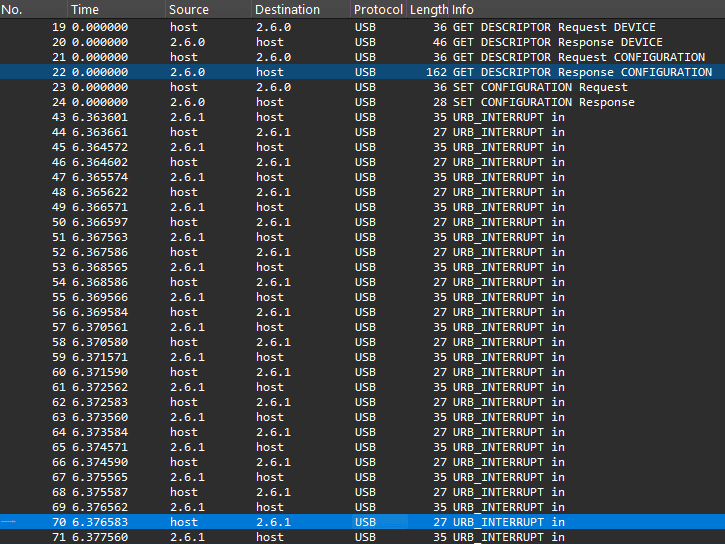
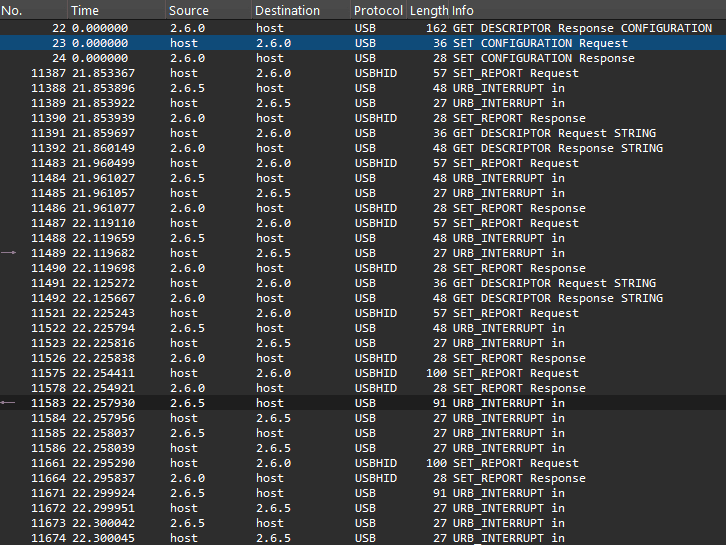
Whats left is a a small amount of packets.
0000   1b 00 10 50 31 97 04 87 ff ff 00 00 00 00 09 00
0010   01 02 00 06 00 85 01 40 00 00 00 b4 06 00 22 22
0020   02 90 01 20 03 b0 04 80 0c c0 12 15 05 04 01 35
0030   00 00 00 00 00 00 00 00 00 00 00 00 00 00 00 00
0040   00 00 00 00 00 00 00 00 00 00 00 00 00 00 00 00
0050 00 00 00 00 00 00 00 00 00 00 00Note: this was verified after watching the battery drop battery level and verifying the byte changed to the correct value.
Hex View  00 01 02 03 04 05 06 07  08 09 0A 0B 0C 0D 0E 0F

00000000  B4 06 00 22 22 02 90 01  20 03 B0 04 80 0C C0 12
00000010  15 05 04 01 35 00 00 00  00 00 00 00 00 00 00 00
00000020  00 00 00 00 00 00 00 00  00 00 00 00 00 00 00 00
00000030 00 00 00 00 00 00 00 00 00 00 00 00 00 00 00 00 Communication Flow
Host SET_REPORT
Firstly the Host needs to send a special SET_REPORT to EP0, the root of the composite device.This is special as it appears Motospeed is utilising EP0 and SET_REPORT to send commands to the mouse like a private command channel with no need for custom drivers.
The SET_REPORT packet has these properties:
Hex View  00 01 02 03 04 05 06 07  08 09 0A 0B 0C 0D 0E 0F

00000000  21 09 B5 02 04 00 15 00  B5 03 00 00 00 00 00 00
00000010  00 00 00 00 00 00 00 00  00 10 00 00 00 00 00
bmRequestType: 0x21,bRequest: 0x09wValue: 0x02b5,wIndex: 4
data: b5 06 00 00 00 00 00 00 00 00
00 00 00 00 00 00 00 00 00 00 00
Device Battery Report
After the device receives the SET_REPORT, it sends a 64-byte HID interrupt IN report on EP5 (Vendor Defined HID Device).Hex View 00 01 02 03 04 05 06 07 08 09 0A 0B 0C 0D 0E 0F
00000000 B4 06 00 22 22 02 90 01 20 03 B0 04 80 0C C0 12
00000010 15 05 04 01 35 00 00 00 00 00 00 00 00 00 00 00
00000020 00 00 00 00 00 00 00 00 00 00 00 00 00 00 00 00
00000030 00 00 00 00 00 00 00 00 00 00 00 00 00 00 00 00 - Offset
0x00, Value:B4(Report ID) - Offset
0x14, Value:35(Battery Level (53%))
Charging
There aren't many changes when the mouse is charging, but still connected wirelessly, you still send theSET_REPORT and the packet received is almost identical. The only difference is that it sets the first bit to indicate charging.
e.g. If it is charging and it is at 31%
(0x1F), it would set the first bit to 1 hence returning 159% (0x9F)0001 1111 (Not Charging)1001 1111 (Charging)Plugged in
When it is plugged in however, there are some changes.Firstly the firmware reports the manufacturer as Motospeed instead of Darmoshark and the device is reported as "MOTOSPEED' - 'X6"
Secondly, although the USB device tree is identical to the dongle, while the VID is identical, the PID changes.
Lastly, the battery packet no longer returns useful information.
In this example you can see that when plugged in directly, it reports an entirely wrong battery level.
Dongle (Not Charging)
Battery HEX: 0x3E (62%)
Battery Actual: 62% (Not Charging)
Hex View  00 01 02 03 04 05 06 07  08 09 0A 0B 0C 0D 0E 0F

00000000  B4 06 00 22 22 02 90 01  20 03 B0 04 80 0C C0 12
00000010  15 05 04 01 3E 00 00 00  00 00 00 00 00 00 00 00
00000020  00 00 00 00 00 00 00 00  00 00 00 00 00 00 00 00
00000030  00 00 00 00 00 00 00 00  00 00 00 00 00 00 00 00
Dongle (Charging)
Battery HEX: 0xBE (190%)
Battery Actual: 62% (Charging)
Hex View  00 01 02 03 04 05 06 07  08 09 0A 0B 0C 0D 0E 0F

00000000  B4 06 00 22 22 02 90 01  20 03 B0 04 80 0C C0 12
00000010  15 05 04 01 BE 00 00 00  00 00 00 00 00 00 00 00
00000020  00 00 00 00 00 00 00 00  00 00 00 00 00 00 00 00
00000030  00 00 00 00 00 00 00 00  00 00 00 00 00 00 00 00
Plugged in directly
Battery: 0xA4 (164%)
Battery Actual: IDK
Hex View  00 01 02 03 04 05 06 07  08 09 0A 0B 0C 0D 0E 0F

00000000  B4 06 00 22 22 02 90 01  20 03 B0 04 80 0C C0 12
00000010  15 05 04 01 A4 00 00 00  00 00 00 00 00 00 00 00
00000020  00 00 00 00 00 00 00 00  00 00 00 00 00 00 00 00
00000030  00 00 00 00 00 00 00 00  00 00 00 00 00 00 00 00
Dongle (Not Charging) 0011 1110
Dongle (Charging) 1011 1110
Plugged In 1010 0100
Additionally, I could not find any Wireshark packets that had some hex that reflected the battery when it was plugged in.
Finally, I have no idea if the battery level is even reported at all when plugged in, as the official software never actually shows the battery level when charging, just that it is charging.
Conclusion
This is the 1st part of a set of articles on my research on the Motospeed X6 with future topics including how their button-remapping, RGB, dpi and macros work.Ultimately, I completed my goal and discovered how the Motospeed X6 reports its battery levels and if it is charging.
Based on this research I made a system tray utility that shows your current battery and charge status, available now here.
And for those who want to take a look at the POC code, it is available here
AI Use Disclaimer
AI was used as a learning resource to help understand the USB packet flow, write some code and as a psuedo search engine.This article has NOT been written with AI as is the case with all of my articles thus far.